

 EN
EN  FR
FR  ES
ES 
Manage Your WordPress Emails with WPMasterToolKit's SMTP Mailer Module
Introduction
Sending emails is a critical point on WordPress. By default, WordPress uses the PHP function mail()which is often misconfigured on hostings and causes recurring problems: emails not received, spam messages or incorrect sender.
The module SMTP Mailer from WPMasterToolKit has been designed to solve these problems once and for all, offering a reliable, centralized and scalable SMTP configuration for both single sites and corporate environments.
Which plugin can the SMTP Mailer module replace?
The module SMTP Mailer can replace :
- WP Mail SMTP
- FluentSMTP
- Post SMTP Mailer
- Plugins dedicated solely to changing the WordPress sender
- Custom snippets for PHPMailer
The major advantage is that it integrates seamlessly into the WPMasterToolKit ecosystem, without needlessly loading code when the module is deactivated.
Customize your WordPress email sender
The module makes it easy to define :
- Visit sender's name
- L'sender's email address
These settings override the WordPress default values (WordPress <wordpress@domain.tld>), often misunderstood by mail servers.
One option Force sender is also available to impose these values, even if other plugins (forms, e-commerce, etc.) attempt to define their own sender.
Sending emails via external SMTP
The core of the module is based on advanced integration of PHPMailerentirely controlled by WPMasterToolKit.
Depending on the provider selected, the module replaces native WordPress behavior and sends emails via a reliable SMTP server.
Available suppliers
- PHP (default) uses standard server configuration
- Custom SMTP compatible with any host or SMTP service
- Gmail (PRO) secure OAuth authentication
- Outlook / Microsoft (PRO) OAuth authentication
- SendGrid (PRO)
- Amazon SES (PRO)
- Numerous suppliers are already scheduled to arrive in the near future (Mailgun, Brevo, etc.).
Each supplier has its own configuration interface, loaded only when necessary.
Documentation by integration
- Gmail
- Outlook
- SendGrid
- Amazon
- Brevo
- Mailgun
- SparkPost
- MailSender
- Resend
- SendLayer
- SMTP2GO
- Elastic Email
- Zoho Mail
- SendPulse
- PostMark
- SMTP.com
- Mandrill
Integrated email test
The module includes a email test directly in the administration interface :
- Immediate delivery to an address of your choice
- Clear and explicit HTML message
- Real-time feedback on success or failure
- Display PHPMailer errors if available
This allows you to validate the configuration without leaving WordPress.
Advanced PHPMailer management
From a technical point of view, the module goes further than most SMTP plugins:
- Controlled replacement of the global PHPMailer instance
- Intelligent field management
Reply-To - Respect or conditional overloading of parameters defined by WordPress or other extensions
- Complete cleansing of recipients and headers before each test email
This approach guarantees stable behavior, even on complex sites.
How to use the SMTP Mailer module
- Activate the SMTP Mailer in WPMasterToolKit
- Define the sender's name and email address
- Choose a shipping provider
- Configure SMTP or OAuth settings
- Save settings
- Send a test email to validate the configuration
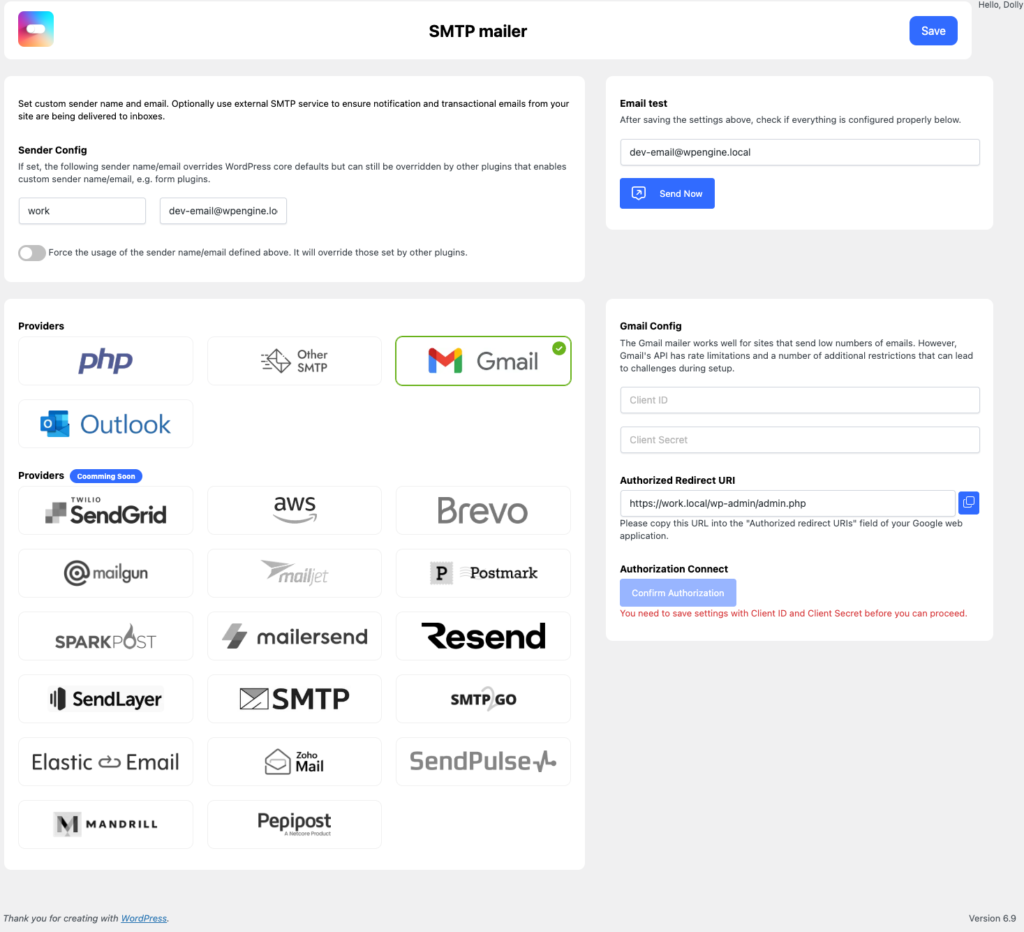
No modification of WordPress files or constants is required.
Our technical choices
We have chosen :
- Using native hooks
wp_mail_from,wp_mail_from_nameandphpmailer_init - Dynamically load SMTP providers
- Secure all AJAX actions with nonce
- Centralize settings in a single WordPress option
- Never send emails if the module is disabled
Each decision is aimed at reliabilitythe safety and the maximum compatibility.
Conclusion
The module SMTP Mailer from WPMasterToolKit offers a complete, modern and scalable solution for sending WordPress emails.
It's just as suitable for showcase sites as it is for e-commerce stores or platforms with high email volumes.
With clear configuration, advanced SMTP support and clean PHPMailer integration, you can finally be sure that your site's emails arrive where they're supposed to: in the inbox.
