

 EN
 FR
 ES

The version 2.26.0 of WPMasterToolKit makes it easier to get started with the plugin and enhances the free version.
This update introduces a guided setup to enable the correct modules right after installation, makes the module Activity Log Available for free and includes five new modules: White Label CMS, Captcha on login form, How to Comment on Everything, Admin Boost and Image Plugins. All of them are available in the free version, with additional features in the Pro version.
It also improves Media Library & Post Folders and fixes two issues in Media Encoder and SMTP Mailer.
Here are the details on what's new in WPMasterToolKit 2.26.0.
A guided setup to get you started
With over a hundred modules, it's not always easy to know where to start. WPMasterToolKit 2.26.0 now offers a guided setup wizard, displayed after the plugin is activated.
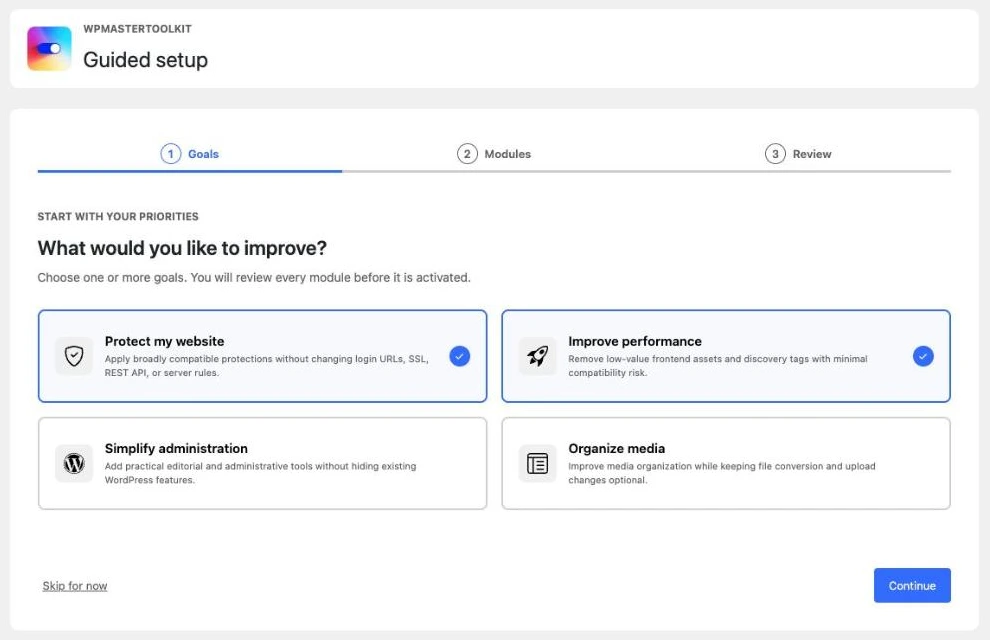
The wizard consists of three steps: Goals, Modules and Review.
Four options to choose from
- Protect my website: broadly compatible security measures, without changing the login URL, SSL, the REST API, or the server rules.
- Improve performance: Removing unnecessary resources and tags on the client side, with minimal risk to compatibility.
- Simplify administration: practical tools for editing and administration, without overriding WordPress's existing features.
- Organize media: Better organization of the media library, making file conversion and changes during import optional.
Recommendations You Can Keep Under Control
For each objective, the wizard displays a selection of modules. The recommended modules are checked by default, while optional modules—which may affect compatibility (such as changing the login URL, enforcing SSL, or limiting login attempts)—remain disabled until you select them. They are accompanied by a warning and, for some, their main settings.
The stage Review summarizes the configuration before applying it. Only the listed modules are enabled: Modules that are already active and their settings remain unchanged. A summary then shows what has been enabled, and the wizard can be restarted at any time. You can also skip it by selecting «Skip for now.».
Activity Log Is Now Free
The module Activity Log is now available in the free version of WPMasterToolKit.
It logs more than 100 types of events: user logins and accounts, content creation and modification (including before-and-after values), media, menus, comments, plugins, themes, WordPress updates, and sensitive settings. Each event can be enabled or disabled individually.
Logs are stored in protected daily files rather than in the database. The free version retains one month of history; the Pro version adds WooCommerce tracking, filters, exclusions by user, role, IP address, or content type, and a configurable retention period.
Learn more about the Activity Log module
White Label CMS: An Administrative Interface Tailored to Your Brand
The new module White Label CMS Replaces WordPress branding elements in the admin panel: the admin bar logo, the «Howdy» greeting, the footer credit, and the WordPress version.
It also allows you to display a custom welcome sign on the dashboard, which is visible depending on the user's role, and to hide the site-side administration bar, the «Help» tab, and the «Screen Options.».
The Pro version includes, among other features, an image at the top of the side menu, a footer with an image and a link, a title and a dashboard icon, as well as home panels built from a page on the site or an Elementor template.
This module is separate from the Pro module White Label existing one, which renames WPMasterToolKit and restricts access to the plugin.
Learn More About the White Label CMS Module
Captcha on the login form: a local captcha for login forms
Captcha on login form adds a simple addition problem to the native forms of loginof lost password and’registration from WordPress.
The CAPTCHA is generated and verified directly on your server: no third-party services are used, and no visitor data is transmitted outside your system. Each question is single-use, expires after 10 minutes, and the number of attempts is limited per IP address.
In the Pro version, the mode Adaptive Displays the question only in the event of suspicious activity: repeated failed login attempts from a browser or IP address, an excessive number of submissions, or a form submitted too quickly. All thresholds are adjustable.
The module works with Limit Login Attempts, two-factor authentication, Move Login URL, and Custom Login Design.
Learn more about the "Captcha on Login Form" module
Discussions pinned to your pages with the Comment on Everything module
How to Comment on Everything allows you to collaborate directly on the site. From the admin bar, click on an element on a page (a title, a paragraph, a button, etc.) to pin a private discussion to it.
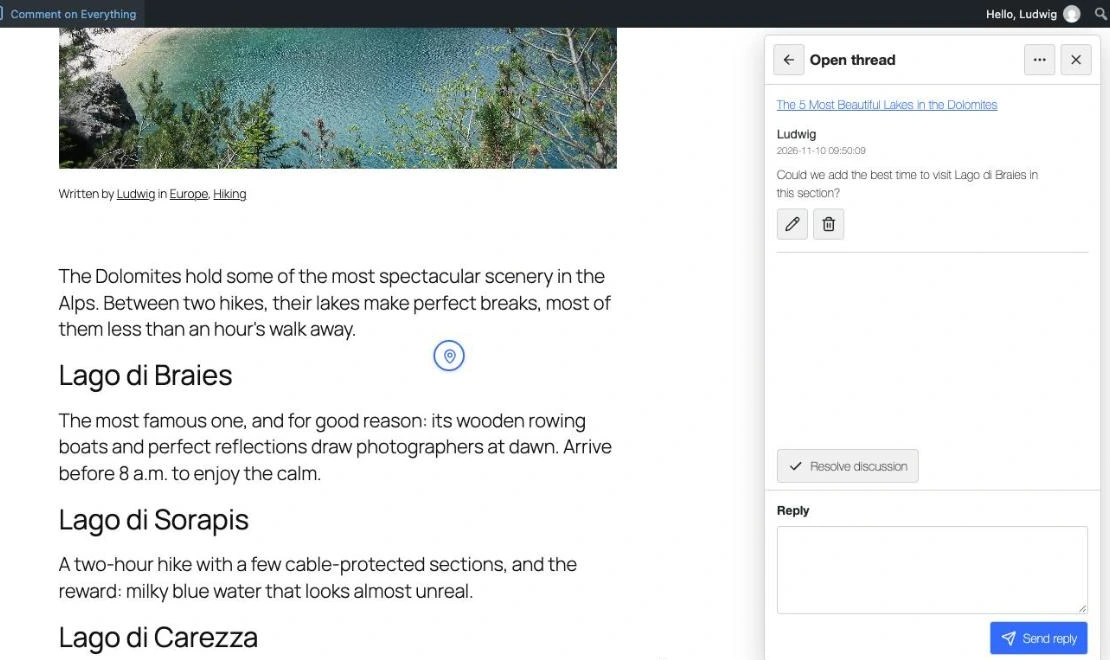
Discussions can be held regarding the site's content, the home page, and several administration screens: dashboard, content lists, users, media library, and comments. Each thread can receive replies, be marked as resolved and then reopened, and all discussions can be viewed from the module screen.
In the free version, administrators collaborate with each other. The Pro version opens discussions to specific roles or users, automatically attaches a screenshot to each new discussion, and adds tracking filters.
Learn more about the "Comment on Everything" module
Admin Boost: More Responsive Administration in a Single Session
Many extensions query external services every time an admin page loads. Admin Boost temporarily blocks these outgoing HTTP requests, only for your session.
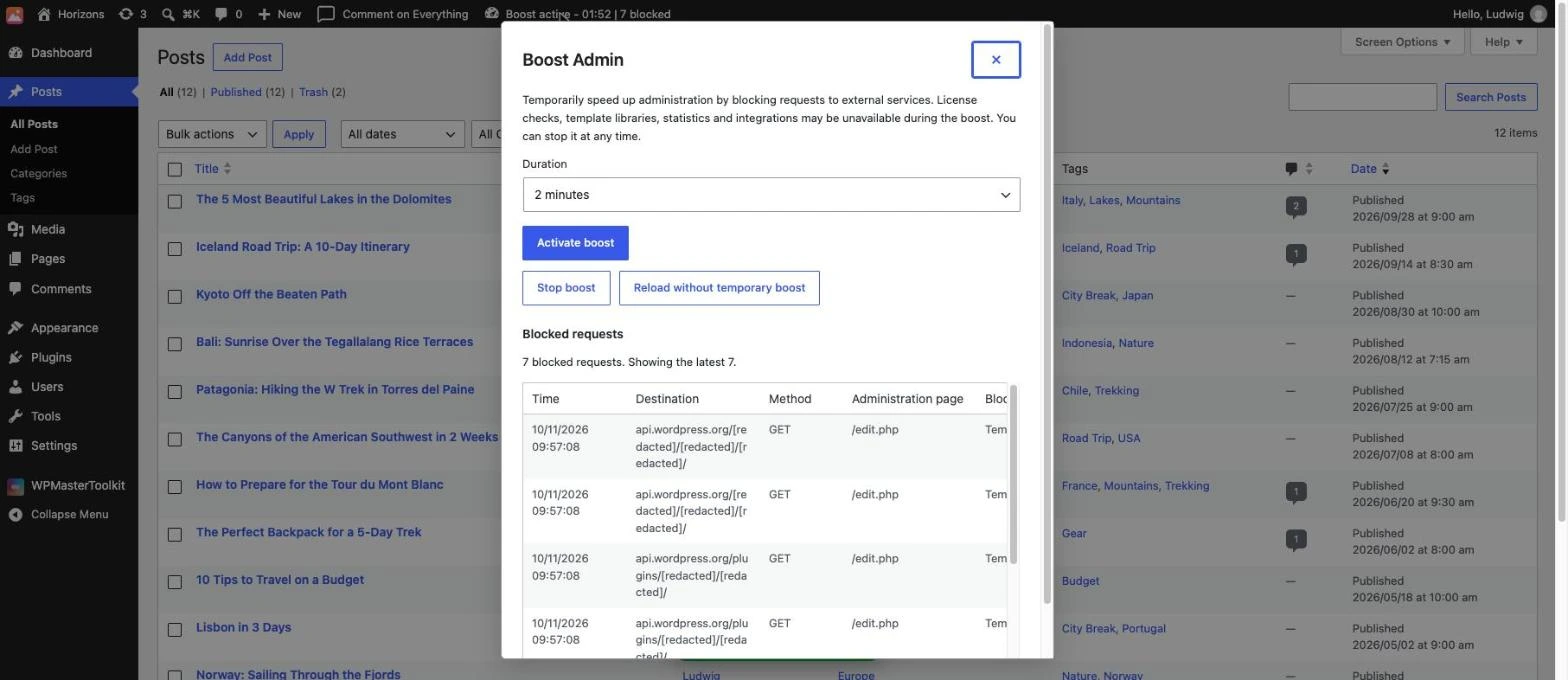
The boost is launched from the admin bar, which then displays a countdown timer and the number of blocked requests. Requests to your own site, cron jobs, AJAX and REST calls, and sensitive screens—such as updates—are never blocked.
The free version offers a 2-minute boost. The Pro version adds longer durations, rules to allow or block certain services, excluded pages, a history of blocked requests, and a debug mode that identifies the extension responsible for each call.
Learn more about the Admin Boost module
Icons for your extensions using the Image Plugins module
The module Image Plugins displays each extension's icon next to its name on the screen Installed Extensions.
The icons come from WordPress.org, a selection of well-known premium plugins, and the WooCommerce.com marketplace. They are loaded progressively and cached, with no configuration required.
Learn more about the Image Plugins module
Media Library & Post Folders: Drag-and-Drop Between Folders
The module Media Library & Post Folders now allows you to Move media files from one folder to another using drag-and-drop. A message confirms each successful move or indicates a possible failure.
Learn more about the Media Library & Post Folders module
Bug fixes
- Media Encoder: EXIF orientation data is now read only from JPEG images to avoid errors with other formats.
- SMTP Mailer: The saving of PHP Mailer mode settings has been fixed, and previously saved sender settings are retained when provider options are cleared.

A version that's easier to use right from the start
With WPMasterToolKit 2.26.0, the guided setup lets you enable the modules that best suit your goals with just a few clicks, while’Activity Log and five new modules have been added to the free version.
White Label CMS customizes administration, Captcha on login form secures login forms without using an external service, How to Comment on Everything centralizes feedback on the pages, Admin Boost speeds up administration and Image Plugins makes the list of extensions easier to read.
As always with WPMasterToolKit, these features remain independent: You only activate the modules that your site actually needs.