

 EN
 FR
 ES

Activity Log Module: A history of everything that happens on your WordPress site
Who edited this page? Who disabled this extension? When did this account's role change? The module Activity Log WPMasterToolKit logs actions performed on your site (users, content, media, menus, comments, plugins, themes, settings, and—in the Pro version—WooCommerce) and displays them in a log that can be viewed from the admin panel. The plugin is available in a free version; certain features are exclusive to the Pro version.
Which plugin can this module replace?
Activity Log covers most of what activity log extensions offer, such as Simple History, WP Activity Log or Stream : connections, content changes with before-and-after values, installing and updating extensions, and changes to sensitive settings. That's one less extension to install and maintain.
Main features
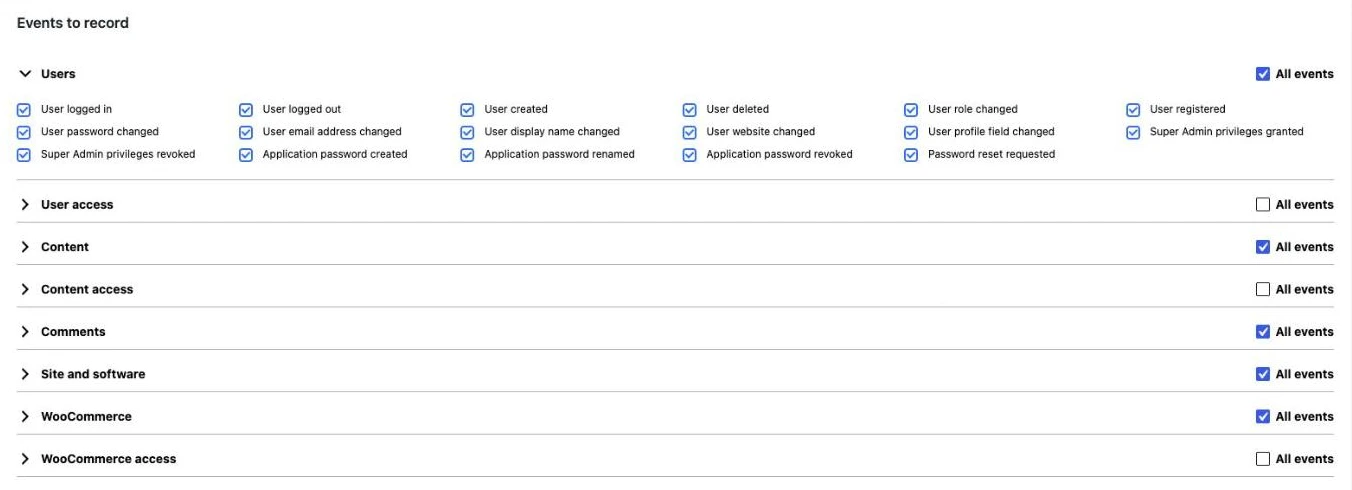
More than 100 events, sorted by category
- Users: logging in, logging out, creating, deleting, changing roles, registering, changing passwords, email addresses, display names, or websites, Super Admin privileges, application passwords, and password reset requests.
- User Access (disabled by default): Viewing another user's profile; access denied by the administration.
- Content: creating, moving to the trash, restoring, and deleting content; field-by-field edits (title, content, excerpt, author, permalink, publication date, status, visibility, featured image, template, categories, tags, etc.); taxonomy terms; media; navigation menus.
- Content Access (disabled by default): content opened in the editor, content viewed, access granted or denied to password-protected content.
- Comments: creation, reply, edit, approval, spam, trash, restore, permanent deletion.
- Website and software: Enabling, disabling, installing, updating, and removing plugins and themes; updating WordPress; changing the site address, the administrator email address, the permalink structure, search engine visibility, user registration settings, and the default user role.
- WooCommerce (Pro): products and variations, orders, refunds, coupons, shipping zones and methods, taxes, payment gateways, and WooCommerce settings, with details on the modified fields (price, SKU, inventory, order status, etc.). The category WooCommerce Access (Pro, disabled by default) also tracks product views, orders, and file downloads.
Each event can be enabled or disabled individually in the «Events to Record» section.
An easy-to-read log with before-and-after details
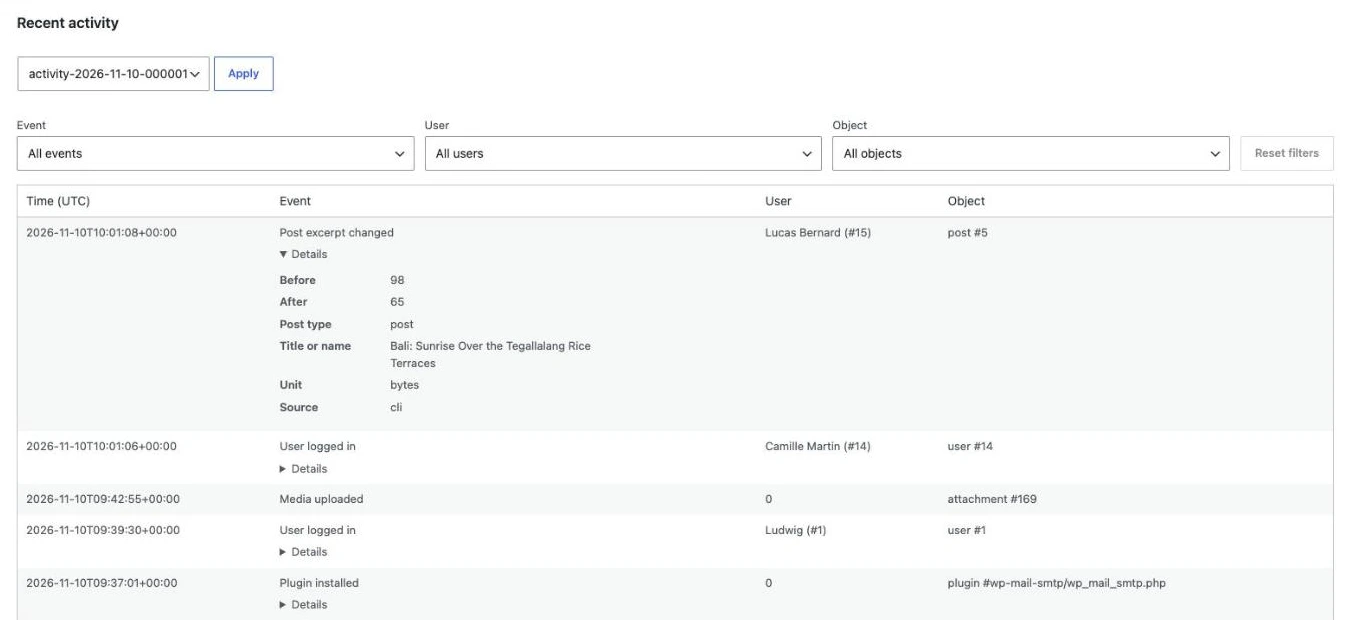
The «Recent Activity» section displays events from newest to oldest: date (UTC), event, user, and affected object. Clicking «Details» reveals useful information: old and new values, content title, and source of the action (interface, system, or WP-CLI). You can select the day you want to view from the list of daily logs. In the Pro version, filters by event, user, and object let you find an action in just a few seconds.
Retention and Purge
In the free version, the history is retained for one month. With the Pro version, you can choose to keep everything or delete events older than a certain number of days, months, or years (3 months by default). The cleanup runs daily via the WordPress cron job, and the «Purge Old Data» button triggers an immediate purge.
Exclusions (Pro)
To maintain a relevant log, the Pro version allows you to exclude certain users, roles, IP addresses (IPv4, IPv6, or CIDR ranges), or content types from being logged. Entries that have already been logged remain unchanged.
Restricted Access (Pro)
By default, all administrators can view the log. In the Pro plan, the «Only me» option restricts access to the administrator who configured it; if that account loses its administrative privileges, access is restored to the other administrators.
How to use this module
- Activate the Activity Log in WPMasterToolKit, then open WPMasterToolkit > Activity Log.
- Under «Events to record,» expand each category and check the events you want to track. Enable «User access» or «Content access» if you also want to track page views.
- In Pro, configure the retention period, exclusions, and access to the module.
- Click «Save.».
- Check the activity in the «Recent Activity» section and click «Details» to see what has changed.
Our technical choices
- Daily files rather than the database: Events are recorded in
wp-content/wpmastertoolkit/activity-log/, one file per day (and per site in a multisite installation), in JSON format, with one line per event. The database does not grow, and purging involves deleting entire files. - Protected logs: Each file begins with a PHP statement that returns a 404 error if called directly, with restricted access permissions. The module regularly checks to ensure that the logs are not accessible from the web, and suspends writing if they are.
- Sensitive data masked: Certain data (billing and shipping addresses, promo codes, webhook URLs, etc.) are stored in a masked format.
- Reliable IP blocking: The comparison is based on the connection address as seen by the server, without relying on proxy headers, which may be forged.
- A Preserved History: Disabling the module stops the scheduled purge without deleting existing logs.
For Developers
Every event involves action wpmastertoolkit/activity_log/event, including the event ID, user, object type, object ID, and details. You can connect to it using add_action() to respond to an activity, such as forwarding it to an external tool.
Conclusion
Activity Log provides a clear overview of who is doing what on your site, without requiring any additional plugins and without slowing down the database. The free version already covers users, content, comments, and plugins; the Pro version adds WooCommerce, filters, exclusions, and a configurable retention period.