

 EN
 FR
 ES

White Label CMS Module: A WordPress admin panel customized with your agency’s or client’s branding
The module White Label CMS WPMasterToolKit replaces WordPress branding elements in the admin area: the admin bar logo, the «Howdy» greeting, the footer, the dashboard title, and more. It also adds a custom welcome screen and hides elements that aren’t needed by your clients. The plugin is free; some features are exclusive to the Pro version.

Which plugin can this module replace?
It includes the main features of extensions such as White Label CMS, from’Ultimate Dashboard for the welcome screen, or small extensions that hide the admin bar. To take it a step further, you can customize the login page with the Custom Login Design (Pro) module and the admin menus with Admin Menu Organizer.
Main features
Branding
- Admin Bar Logo: Replaces the WordPress logo in the admin bar (maximum 20 px tall), along with its alt text (Admin Bar Alt Text).
- Admin Bar URL (Pro): Change the logo link and the WordPress.org link.
- Replace "Howdy" Text: Replace «Howdy,» with the text of your choice («Hello,» «Bonjour,» etc.), or delete it by leaving a single space.
- Side Menu Image (Pro): Add an image at the top of the side menu (maximum 160 px wide), with a link and alt text.
- Footer Text: Replaces the WordPress credit in the footer. In the Pro version, add an image (Footer Image) and a link (Footer URL).
- Hide WP Version: hides the WordPress version and the update text in the footer.
Dashboard
- Dashboard Title and Dashboard Icon (Pro): Change the title «Dashboard» and add a logo next to it.
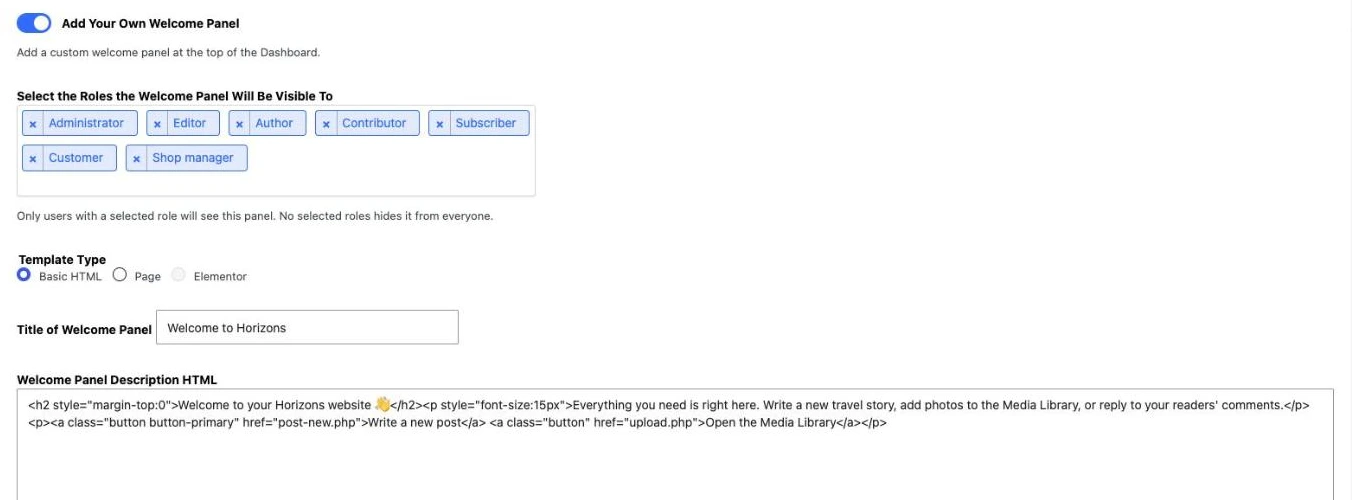
- Add Your Own Welcome Panel: Replaces the WordPress welcome screen with your own, visible only to the user roles you choose.
- Three types of content For this sign: Basic HTML (free: a title and some HTML), Page (Pro: a published page on your site, displayed without the theme's header or footer) or Elementor (Pro: a saved Elementor template).
A streamlined interface
- Hide the Front-end Admin Bar: Hides the admin bar on the public site for the selected roles (it remains visible in the admin panel).
- Hide Help Box: Removes the «Help» tab at the top of the administration screens.
- Hide Screen Options: Remove the «Display Options» tab.
Access to the Module (Pro)
The «Only me» option restricts configuration of the module to the administrator who saves it. The access restrictions already defined in WPMasterToolKit, using the White Label (Pro) module, remain in effect.
How to use this module
- Activate White Label CMS in WPMasterToolKit, then open WPMasterToolkit > White Label CMS.
- Under «Branding,» select your logo from the media library, then replace the greeting and the footer text.
- In «Dashboard,» enable «Add Your Own Welcome Panel,» select the relevant roles and content type, and then write your message.
- In «Settings,» hide anything that isn't relevant to your customers.
- Click «Save»: the changes take effect immediately.
Our technical choices
- Everything is handled through WordPress's native filters and actions: no core files are modified, and deactivating the plugin restores the original interface.
- The HTML for the home page is filtered (
wp_kses_post) to prevent script injection. - In Page mode, the page is displayed in a frame that adjusts to its height, without the theme's header or footer. The filter
wpmtk_white_label_cms_page_chrome_selectorsallows you to adjust hidden CSS selectors if your theme uses different tags. - In a multisite setup, each site has its own settings.
- In the free version, any Pro options that have already been saved are not applied, and the home panel reverts to Basic HTML.
Conclusion
White Label CMS lets you provide your clients with a dashboard that reflects their brand, is simpler, and contains no unnecessary references to WordPress. The essential features are free; the Pro version adds a sidebar image, a full footer, a dashboard title and icon, and home screens based on a page or an Elementor template.