

 EN
EN  FR
FR  ES
ES 
The version 2.22.0 of WPMasterToolKit introduces several significant improvements in terms of functionality, stability, and the administration experience. This update notably affects AI-powered alt text generation, the Meta Debugger for WooCommerce, the SMTP Mailer module, as well as two Pro modules: Two-Factor Authentication and Cron Manager.
Compatibility with the new WordPress AI Client API
WPMasterToolKit is paving the way for the future of WordPress by adding support for the WordPress AI Client API, when it is available on the website.
Specifically, the Pro module for automatically generating alternative text for images can now use WordPress’s native AI API instead of the legacy WPMasterToolKit system. If this API is detected, the plugin retrieves templates compatible with image analysis and text generation, then makes them available directly in the module’s settings.
There are two benefits: better integration with the WordPress ecosystem and more centralized management of compatible AI providers. For sites that do not yet use this API, the existing functionality remains available through the fallback system.
Meta Debugger: WooCommerce variations can now be inspected
The module Meta Debugger Gains a very useful improvement for WooCommerce stores: it now supports changes in revenue.
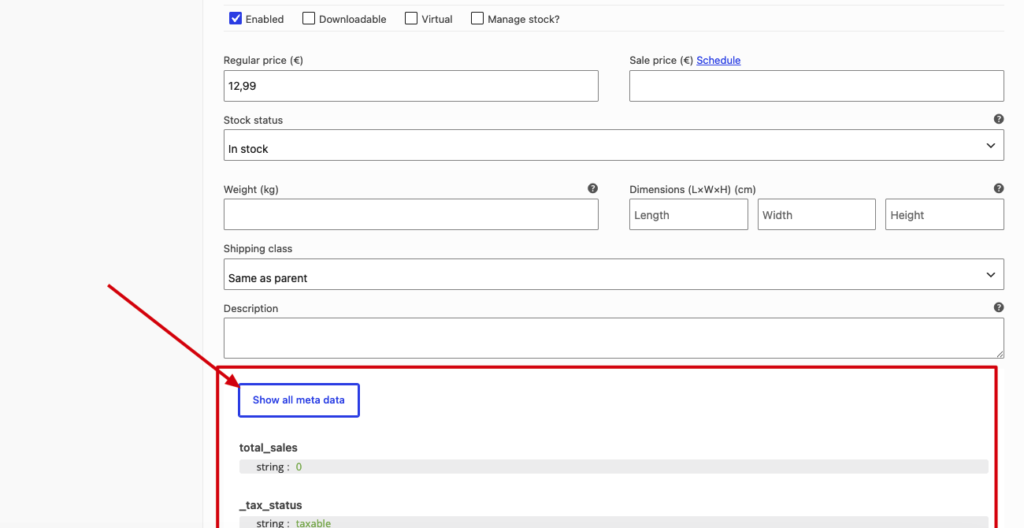
Until now, it was possible to view the metadata for many WordPress objects: posts, users, taxons, comments, WooCommerce orders, and order items. With this release, the metadata for each variation can be viewed directly from the WooCommerce variation editor.
This is particularly useful for developers, integrators, and administrators who need to troubleshoot issues related to pricing, inventory, attributes, imports, ERP synchronization, or custom fields associated with a specific variation.
JavaScript-based loading has also been adapted to work with the elements dynamically added by WooCommerce in the variations interface.
SMTP Mailer: Clearer Configuration and More Reliable Backups
The module SMTP Mailer is undergoing one of the most extensive overhauls in this version.
The sender configuration—that is, the sender name, email address, and the option to force their use—is no longer managed as a standalone global setting. It has now been moved to each SMTP provider.
This allows for a more logical configuration: each provider can have its own sender. For example, a website can use a different address depending on whether it uses PHP Mail, generic SMTP, Gmail, Outlook, SendGrid, Mailgun, Brevo, Amazon SES, or another supported provider.
Another important improvement: the plugin now saves only the selected provider, rather than risking overwriting or unnecessarily modifying the settings of other providers. The save process is also better protected against invalid values or legacy data structures from previous versions.
A button “Reset all providers” has also been added to reset all SMTP provider data. This is useful when a site has tested several providers, changed its email strategy, or wants to start over with a clean configuration.
Finally, several minor adjustments improve stability: validation before saving, better compatibility with older options, and protection against certain cases where settings might have been saved incorrectly.
Two-Factor Authentication Pro: A More Secure and Seamless Login Experience
The Pro module Two-Factor Authentication features significant improvements to the login process.
The main new feature is that the login button is locked until the 2FA script has been properly initialized. This prevents a form from being submitted too early—for example, due to JavaScript not having finished loading, the browser’s autofill feature, or a password manager.
The login flow is now more robust: the module better intercepts native form submissions, checks which 2FA methods are available to the user, and then displays the modal only if necessary.
The handling of autofill cases and submissions triggered by extensions has also been improved. The result: a more reliable user experience and a lower risk of accidentally bypassing the 2FA flow on the interface side.
Cron Manager Pro: A New Health Status for Cron Jobs
The Pro module Cron Manager now displays a status section at the top of its interface.
This section analyzes two key points: the presence of the constant DISABLE_WP_CRON and whether there are any cron jobs that are more than 5 minutes overdue.
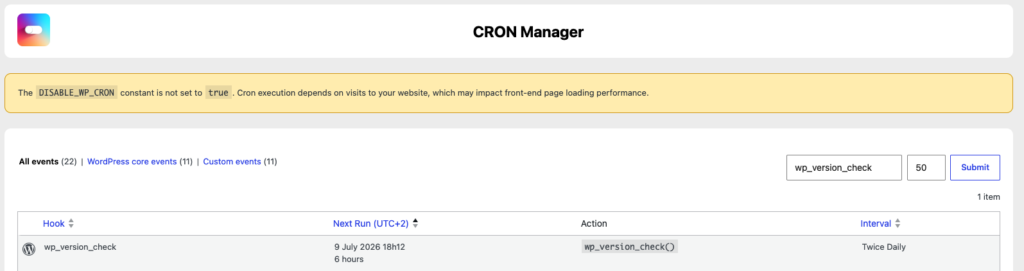
Depending on the situation, WPMasterToolKit displays a clear status: everything is fine, caution advised, or a problem detected. For example, if DISABLE_WP_CRON is not defined at true, the plugin warns that task execution still depends on site visits, which can affect front-end performance. If tasks are delayed despite a correct configuration, the module indicates that the external cron system is likely not working as expected.
This new feature transforms Cron Manager into a more immediate diagnostic tool, not just a dashboard for managing scheduled events.
Cron Manager Pro: Filters Are Preserved in Actions
Another notable improvement in Cron Manager: row actions now retain active filters.
When the administrator filters hooks, performs a search, or changes the number of items per page, and then performs an action such as “Run now,” “Pause,” “Resume,” or “Delete,” the plugin preserves this context in links and redirects.
It's just a small interface detail, but it makes using sites with a lot of cron jobs much more enjoyable.

In a nutshell
WPMasterToolKit 2.22.0 is an update focused on reliability and consistency. It prepares the plugin for future WordPress developments with the AI Client API, improves the day-to-day experience for WooCommerce users with the Meta Debugger, makes SMTP Mailer easier to configure, and strengthens several critical Pro modules.
This version is particularly useful for WooCommerce sites, sites that use advanced SMTP providers, and environments where connection security or the reliability of cron jobs are critical.
