

 EN
EN  FR
FR  ES
ES 
WPMasterToolKit 2.21.0 marks a major milestone in the plugin’s evolution. This new version is more than just a few isolated fixes: it brings together several months of improvements focused on three key areas for WordPress administrators, agencies, and developers: safety, observability and ease of administration.
With this update, WPMasterToolKit becomes easier to monitor, more reliable to maintain, and more robust for managing WordPress sites on a daily basis.
Super Admin Mode in the PRO version

You can now restrict access to these settings in the WPMTK settings by enabling the «Add Super Admins» option and adding only the users authorized to access the WPMTK global settings page.
The idea is that if you're managing a client's website, you don't necessarily want the client to enable or disable modules without knowing what they're doing.
In addition, it's also a good way to prevent any admin from enabling potentially sensitive features such as Adminer, the file manager, etc.
A new log page to help you better understand what's happening on your site
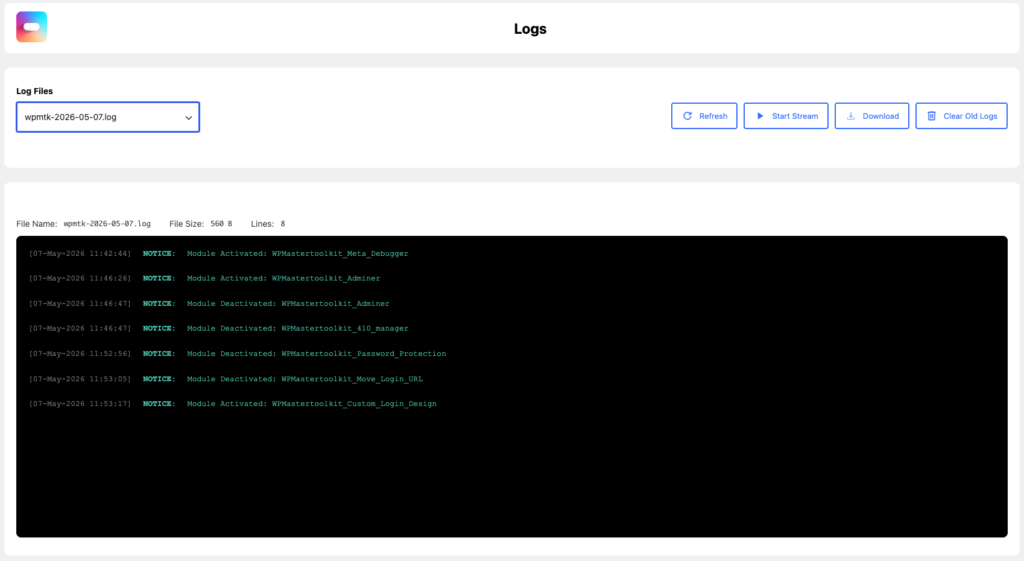
The most notable new feature in WPMasterToolKit 2.21.0 is the introduction of a logs page directly integrated into the WordPress admin panel.
Until now, diagnosing unexpected behavior, troubleshooting a problem, or understanding the cause of an incident often required using multiple tools or even checking server-side files. Now, WPMasterToolKit lets you browse, monitor, download, and clear the plugin's logs from a dedicated interface in WordPress.
This is a major improvement for anyone who manages sites in production or under maintenance. Administrators save time, technical support has more context, and agencies can analyze problematic situations more quickly without having to perform additional technical steps.
This new logs page reinforces a key concept of this release: See Better to Act Better.
Meta Debugger Is Becoming More Useful for WooCommerce
This focus on enhanced visibility is also reflected in the improvements made to the module Meta Debugger.
The module is more convenient for WooCommerce sites because it displays metadata directly on the product variations in the editor. For stores that use complex catalogs, custom fields, or third-party integrations, this improvement makes troubleshooting much easier.
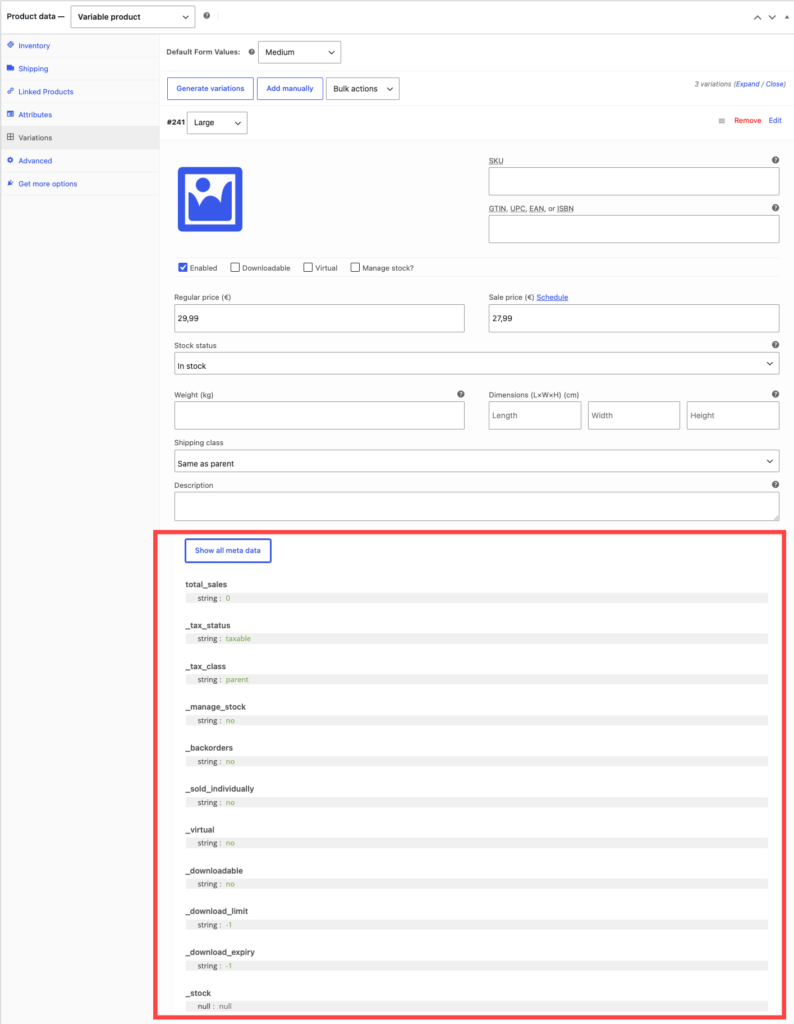
Meta Debugger also handles cases where multiple control elements share the same meta key more effectively. As a result, data inspection is more reliable, ambiguities are reduced, and debugging becomes more precise.
Extensive work to strengthen security across the entire plugin
The true backbone of this development cycle remains the overall strengthening of security.
WPMasterToolKit 2.21.0 improves upon several critical areas: capacity checks, CSRF protection, input validation, AJAX security, handling of critical files, and the reliability of database operations.
In practical terms, this means that many sensitive actions now require stricter checks before they can be executed. This type of improvement isn't always visible in the interface, but it's essential for a plugin that affects important aspects of WordPress.
The goal is clear: reduce the attack area, to improve the reliability of administrative tasks and make the plugin more robust under real-world conditions.
Adminer: A Powerful Module with Better Support
The module Administer He, too, received special attention.
This release cycle included a major security overhaul to prevent the exposure of sensitive information in HTML or URLs. Authentication and session management have also been strengthened.
With WPMasterToolKit 2.21.0, new tweaks further improve its compatibility, particularly with regard to headers Cache-Control and CSRF token management.
Adminer perfectly exemplifies the philosophy behind this version: provide WordPress administrators with powerful tools, without compromising on security fundamentals.
A Better Day-to-Day Administrative Experience
This version also includes several improvements to the user experience.
Editing snippets and technical content is now more enjoyable thanks to the addition of a button that lets you quickly switch between normal mode and full-screen mode.
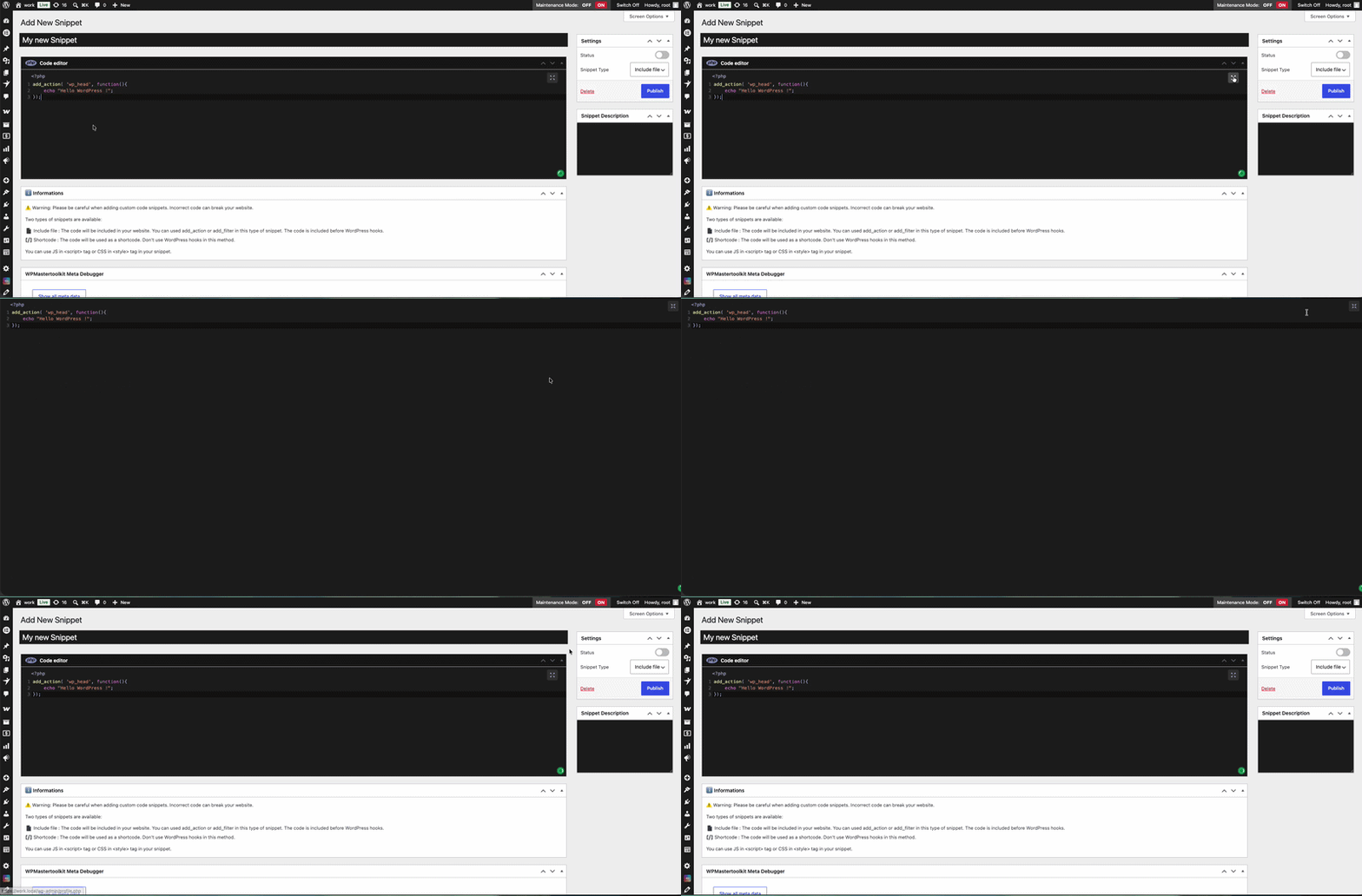
Other, more subtle adjustments improve the day-to-day experience: clearer error messages in Media Encoder, better compatibility with Custom Login Design using the WordPress administrator email confirmation screen, or made even more reliable in Local Avatars by adding dynamic classes to the preview.
Taken individually, these changes may seem modest. Taken together, they make the administrative process smoother and more pleasant.
WPTMK License Directly in wp-config.php
You can now register your WPMasterToolKit license directly in your file wp-config.php :
define( 'WPMASTERTOOLKIT_LICENSE_KEY', 'your_license_here' );More mature existing modules
Several legacy modules are also continuing to mature.
Add Essentials Shortcodes It has become more powerful with support for new settings, improved ACF support, and a smoother interface. WordPress option management now uses a whitelist to prevent the unintentional exposure of sensitive data.
Two-Factor Authentication has been enhanced to better manage public entry points, handle email connections more effectively, and provide clearer user feedback in situations where resources are limited.
Finally, Auto Regenerate Salt Keys adopts a more conservative default frequency to limit side effects with certain extensions that store encrypted data using WordPress keys.

WPMasterToolKit 2.21.0: A More Mature and Reliable Version
WPMasterToolKit 2.21.0 isn't just another update. It's a release that significantly strengthens the plugin and reaffirms its product direction.
The plugin is now more observable thanks to its new logging system, more user-friendly thanks to new administration tools, and, above all, more robust in terms of security and reliability.
For users, this means a more hassle-free WordPress administration experience that is faster to maintain and better equipped for advanced uses.
With this release, WPMasterToolKit continues to live up to its mission: to offer an all-in-one, modular, high-performance WordPress plugin designed to replace many smaller plugins while giving you precise control over what is actually loaded on your site.