

 EN
EN  FR
FR  ES
ES 
Media Trash: Add a Trash Can for Your WordPress Media
Accidentally deleting an image in WordPress can quickly become a problem. Unlike posts or pages, files in the media library can be permanently deleted, resulting in the loss of the associated file.
The module Media Trash by WPMasterToolKit allows you to add a true trash can to the WordPress media library. When a media file is deleted, it can be temporarily stored in the trash can before being permanently deleted.
This means you have a certain amount of time to recover an image, a PDF, or another file that was accidentally deleted.
Why add a trash can to the WordPress media library?
WordPress natively includes a trash mechanism for content such as posts and pages. A similar feature also exists for media, but it is not enabled by default.
Without this protection, permanently deleting an item from the media library may also result in the corresponding file being deleted from the server.
Media Trash enables and uses the built-in mechanism provided by WordPress to offer a grace period before media files are permanently deleted.
In particular, this makes it possible to:
- recover a file that was accidentally deleted; ;
- have a grace period before irreversible deletion; ;
- choose how long deleted media should be retained; ;
- automatically delete old media from the trash; ;
- Avoid keeping unused files on the server indefinitely.
How does Media Trash work?
When the module is activated, WPMasterToolKit enables the native media trash feature by adding the constant MEDIA_TRASH in the file wp-config.php.
Once this feature is enabled, deleted media items will be moved to the Recycle Bin instead of being permanently deleted immediately.
The module then adds its own retention policy to precisely control when these media files should be permanently deleted.
This allows you to take advantage of WordPress’s native features while also benefiting from additional management capabilities that are directly integrated into WPMasterToolKit.
Choose how long to retain deleted media
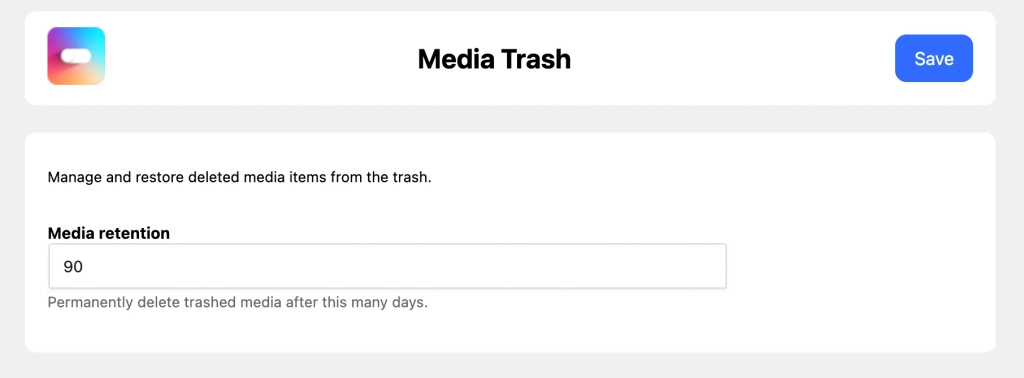
In the module settings, the option Media Retention allows you to choose how many days a file should remain in the Recycle Bin.
By default, this duration is set to 90 days.
It can be configured between 1 and 365 days.
For example, with a 30-day retention period, a media file placed in the trash can remain there for 30 days. Once this period has elapsed, it becomes eligible for automatic permanent deletion.
This retention period applies specifically to media managed by the module. In particular, it allows files to be retained longer than they would otherwise be under WordPress's default trash cleanup settings.
A retention period independent of the global trash can
WordPress uses the constant EMPTY_TRASH_DAYS to determine the general retention period for items placed in the trash.
Media Trash takes this behavior into account while applying its own retention period to attachments.
During the automatic WordPress cleanup, WPMasterToolKit checks how long each media file has been in the trash. If the retention period configured in Media Trash has not yet been reached, its permanent deletion is blocked.
For example, this prevents media set to be retained for 90 days from being deleted prematurely by WordPress's general cleanup mechanism.
However, for it to work properly, the WordPress global trash must be enabled: EMPTY_TRASH_DAYS must therefore be greater than zero.
Restore a media file before it is permanently deleted
The main benefit of a trash can is, of course, that it lets you change your mind.
As long as a media file is still in the trash, it can be restored via WordPress. When a file is removed from the trash, WPMasterToolKit also deletes the metadata that WordPress uses to track its presence in the trash.
The media is thus restored to its normal state and is no longer marked for deletion.
Automatic Cleanup of Old Media
You don't need to come back regularly to manually empty the trash.
Media Trash schedules a daily automatic cleanup. During this cleanup, the module searches for media items that have been in the trash for longer than the configured retention period.
These media files are then permanently deleted.
To limit the amount of work done at any one time, the cleaning process handles a maximum of 100 media items per run.
This approach is particularly useful for sites with a large media library: cleanup is performed gradually rather than attempting to delete a very large number of files in a single operation.
What happens if a media file fails to be deleted?
In rare cases, permanent deletion may fail.
In this case, WPMasterToolKit does not attempt to delete the same media file every time the cleanup is run. The module temporarily records the failure and waits a week before allowing another attempt.
This mechanism prevents the daily repetition of an operation that has just failed, while allowing the cleanup process to continue processing the other eligible media.
How do I use the Media Trash module?
In WPMasterToolKit, simply enable the module Media Trash.
When it is activated, the module attempts to automatically add MEDIA_TRASH to your file wp-config.php. This file must therefore be writable to allow for this automatic configuration.
You can then open the module's settings and set the desired retention period, between 1 and 365 days.
From that point on, the process is automated: deleted media files are moved to the Recycle Bin, can be restored during their retention period, and are permanently deleted once that period has expired.
If MEDIA_TRASH cannot be enabled, or if EMPTY_TRASH_DAYS If it is disabled, WPMasterToolKit displays a notification in the plugin settings to alert you to the issue.
Why rely on WordPress's built-in functionality?
For this module, we decided not to create a completely independent trash can system.
WordPress already has the necessary mechanisms to move attachments to the trash and restore them. WPMasterToolKit therefore enables this native feature via MEDIA_TRASH, and then focuses primarily on conservation policies and automatic cleaning.
This approach allows us to stay as close as possible to how WordPress works and avoid unnecessarily duplicating mechanisms already present in the CMS.
However, the module enhances this functionality with several safeguards: a retention period for media files, daily cleanup in batches of 100 items, and a delay before a retry when a deletion fails.
Finally, when the module is disabled, WPMasterToolKit deletes the cleanup tasks it had scheduled, as well as the constant MEDIA_TRASH which he had added.
Conclusion
The module Media Trash by WPMasterToolKit adds a particularly useful security feature to the WordPress media library.
Instead of risking the immediate and permanent deletion of a file, media files can be temporarily moved to the Recycle Bin and restored in case of an error.
With a Configurable retention period ranging from 1 to 365 days, with daily automatic cleanup and integration based on WordPress's native features, Media Trash offers a simple way to securely delete files from your media library without adding an additional plugin dedicated solely to this feature.