

 EN
EN  FR
FR  ES
ES 
Redirect Manager: manage WordPress redirects simply, cleanly and efficiently
Introduction
Redirects are one of the most frequent needs on a WordPress site. They are useful after a redesign, permalink modification, page deletion, content migration or to correct broken links.
The problem is that many redirection plugins quickly become cumbersome, technical or overloaded with options. At WPMasterToolKit, we wanted to offer a clearer approach: a dedicated module capable of handling redirects cleanly, while remaining consistent with our all-in-one philosophy.
The module Redirect Manager allows you to create, modify, import, export and track redirects, with several execution engines depending on the site environment. It has been designed to cover the most common cases, but also to offer more advanced options such as regular expressions, URL parameter management and logging.
Which plugin can the Redirect Manager module replace?
Depending on your needs, the Redirect Manager module can fully or partially replace plugins such as :
- Redirection
- Simple 301 Redirects
- Quick Page/Post Redirect Plugin
- certain redirection modules integrated into heavier SEO suites
The advantage is obvious: you centralize this functionality in WPMasterToolKit, without adding another plugin to maintain.
A complete redirection module for WordPress
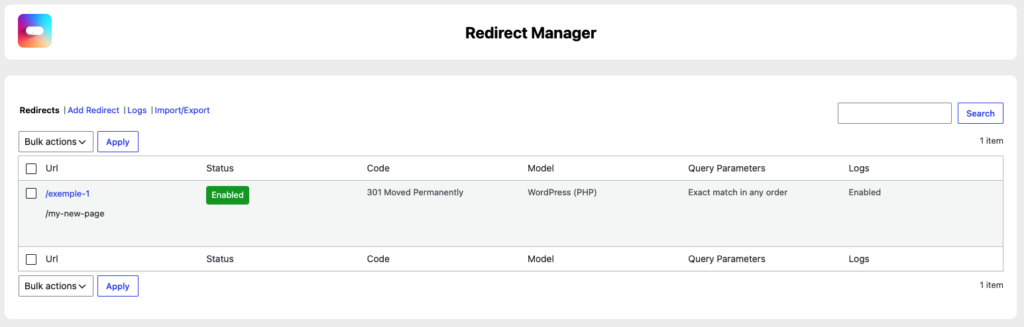
The module lets you manage custom redirects from a dedicated interface in WordPress administration.
Each redirect can contain :
- a source URL
- a target URL
- HTTP code
- a treatment method
- specific behavior for URL parameters
- a regex option
- an activated or deactivated status
- a log option
The module also automatically distinguishes in-house and external.
If the target URL belongs to the same domain as the site, it is registered as an internal redirect. Otherwise, it's treated as an external redirect. This allows you to adapt the redirection treatment to the context.
Three redirect execution modes
One of the strengths of the Redirect Manager module is that it doesn't rely on a single engine. It offers three execution models.
WordPress (PHP)
The WordPress (PHP) executes redirects directly via WordPress, thanks to the hook template_redirect.
This is the default mode. It's particularly useful when you want to manage redirects without touching the server configuration, or when you're using hosting on which access to Apache or Nginx rules is limited.
In this mode, the module can manage :
- exact matches
- URL parameters
- regex redirections
- logs
It's also the most functionally flexible mode.
Apache
The Apache allows redirections to be written directly to the .htaccess.
When a redirect uses this template, the module automatically generates an Apache rule at the time of registration. When the module is deactivated or a redirect is deleted, the rule is removed.
This is a particularly interesting mode for improving performance, since the redirection can be processed even before WordPress has fully loaded.
This mode is available in the Pro version and is particularly suited to sites hosted on an Apache server.
Nginx
The Nginx does not automatically modify the server configuration, but prepares configuration snippets that the plugin can supply via a dedicated filter.
The module then generates location adapted to the type of redirect, with support for exact redirects and regexes.
This mode is also reserved for the Pro version.
Real URL parameter management
The module doesn't just compare two raw URLs. It offers a range of behaviors for handling query strings, which is very useful in real-life situations.
Three modes are available:
Exact match in any order
This is the strictest behavior.
If the source URL contains parameters, the module compares the query parameters with the expected ones, without relying on their order. This avoids false negatives linked to the order of variables in the URL.
Example: a redirection defined with ?utm_source=x&ref=y may also correspond to ?ref=y&utm_source=x.
Ignore all parameters
In this mode, only the path and route are taken into account. All parameters present in the requested URL are ignored.
This is useful when you want to redirect a page independently of its tracking or filtering parameters.
Ignore parameters and pass them on to the target
This mode is very useful when you want to redirect a URL without blocking incoming parameters.
The module ignores the parameters to make the match, but then adds them to the target URL. This allows certain marketing or technical data to be retained during the redirection process.
Redirections regex: for advanced cases
The module supports regular expressions via a dedicated option in the source URL.
When regex mode is enabled, redirection no longer functions as a simple exact match. It becomes capable of handling more complex patterns and dynamically redirecting multiple URLs with a single rule.
In WordPress mode (PHP), the module uses preg_match() to detect the match, then preg_replace() to generate the final destination.
In Apache mode, it generates a rule RedirectMatch.
In Nginx mode, it produces a rule location ~.
This is a very useful feature for :
- redirect a series of old URLs
- supporting a structural redesign
- capture repetitive patterns
- avoid creating dozens of manual redirects
Extensive HTTP code support
The module is not limited to 301 redirection.
It supports several HTTP codes, including :
- 301 Moved Permanently
- 302 Found
- 303 See Other
- 307 Temporary Redirect
- 308 Permanent Redirect
- 404 Not Found
- 410 Gone
- 451 Unavailable For Legal Reasons
- and several 4xx and 5xx codes
This opens up a wider range of uses than simply changing the URL. You can also use the module to indicate that a resource has disappeared, is no longer available or should no longer be accessible.
This is particularly interesting for SEO and content lifecycle management.
A logging system to track redirects
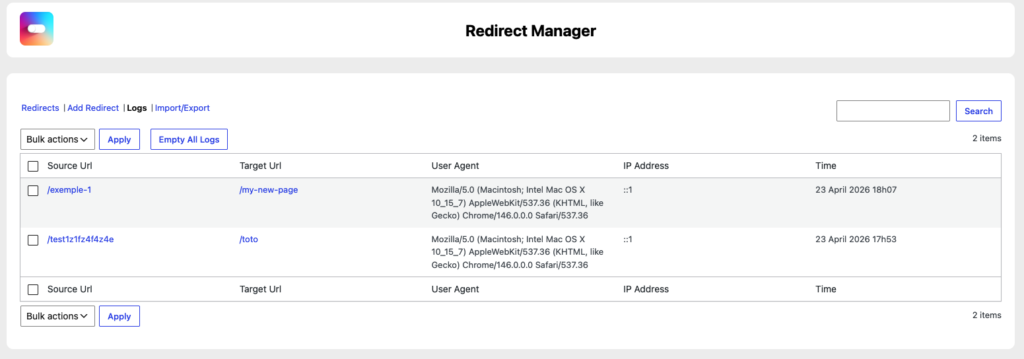
In the Pro version, the module features a logs.
Each time a redirect is executed in WordPress mode (PHP), it can record :
- the requested URL
- target URL
- user agent
- IP address
- the date
This information is stored in a dedicated table. They can then be consulted from the administration interface, searched, deleted individually, deleted en masse or emptied completely.
This is useful for understanding how redirects are actually used, identifying old links that are still active or spotting unexpected behavior.
Import and export redirections in CSV format
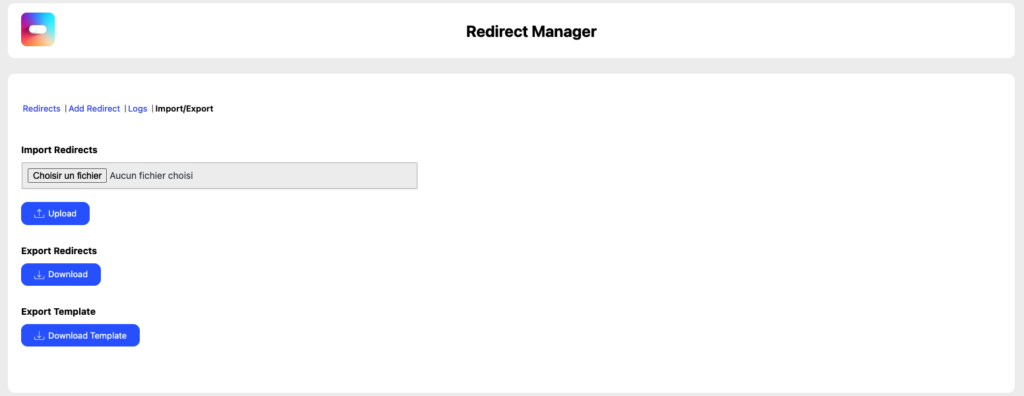
The module also includes a CSV import/export system, available in the Pro version.
Exporting redirects
You can export all your redirections to a CSV file containing the following fields:
- URL From
- URL To
- Params
- Model
- Code
- Regex
- Internal
- Status
- Logs
This allows you to save the configuration, migrate it to another site or reprocess it in a spreadsheet.
Ready-to-use CSV template
The module can also generate a template file to help prepare an import in the correct format.
Import with validation
During import, each line is analyzed and validated. If certain values are invalid, the module does not necessarily block the entire process. It corrects inconsistent values where possible, and then displays detailed warnings.
For example, it can automatically deliver :
- the template on WordPress (PHP)
- default mode settings
- HTTP code on 301
- status set to active
- logs disabled
- regex on disabled
It's an excellent compromise between flexibility and safety.
An interface designed to avoid errors
The module's interface automatically adapts the available options according to the user's choices.
For example:
- if regex mode is enabled, some parameter-related options are blocked
- if the chosen template is not WordPress (PHP), settings and logs are disabled
- in the free version, Pro options are visible but locked
This interface logic is consistent with PHP-side validations. In other words, the module protects the configuration on two levels:
- in the user interface
- in server processing
This is a very good technical choice, as it considerably reduces input errors or incompatible combinations.
Mass redirection management
The module is not limited to unit management.
From the list of redirections, you can perform grouped actions:
- delete multiple redirects
- activate multiple redirects
- disable multiple redirects
The same principle also applies to logs, with multiple deletion.
This is particularly useful for sites that manage a large volume of historical URLs.
How to use this module
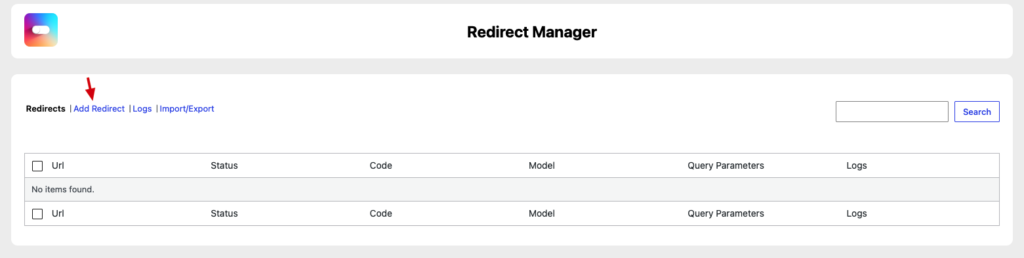
The Redirect Manager module is easy to use.
Start by opening the module page in WPMasterToolKit, then add a new redirection.
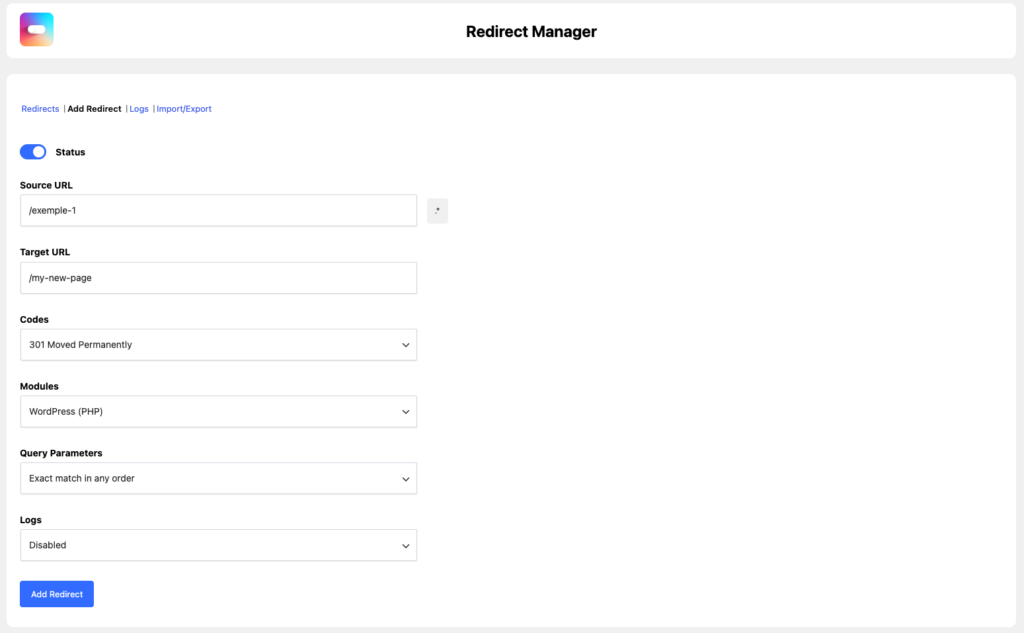
Enter the source URL, the target URL, then select the appropriate HTTP code. Then select the desired execution model:
- WordPress (PHP) for direct management in WordPress
- Apache to write the rule in the
.htaccess - Nginx to generate a compatible snippet
If necessary, activate regex mode to create an advanced redirect. You can also define the behavior of URL parameters.
Finally, enable or disable redirection, then save.
Pro users can also activate logs, import redirects via CSV or export existing configuration.
Why we made these technical choices
The Redirect Manager module is a perfect illustration of our approach in WPMasterToolKit.
We didn't want to create just another redirection manager. We wanted to offer a tool capable of adapting to different hosting environments, while remaining easy to use.
This is why the module combines several levels:
- clean database storage
- execution via WordPress
- Apache compatibility
- Nginx snippet generation
- CSV import/export
- logging
- securing via nonces and capacity checks
- dynamic interface to avoid inconsistencies
Another important point: custom tables for redirects and logs enable clear isolation of module data. This makes the system cleaner, more scalable and easier to maintain than rough storage in WordPress options.
Hooks and integrations to document
There is no do_action() defined in this class, but there is a custom filter used by the module.
Filter wpmastertoolkit_nginx_code_snippets
The module is connected to the filter:
wpmastertoolkit_nginx_code_snippets
This filter adds Nginx snippets generated from redirects registered with the Nginx.
The module automatically injects the appropriate configuration blocks:
location = ...for exact redirectionslocation ~ ...for regex redirections
This filter therefore plays an important role in integrating Nginx redirects with the rest of the WPMasterToolKit ecosystem.
Filter removable_query_args
The module also uses the native WordPress filter :
removable_query_args
It adds the following parameters:
wpmastertoolkit_messagewpmastertoolkit_warnings
This allows WordPress to automatically clean up these URL parameters in the admin after displaying messages and warnings.
Conclusion
The module Redirect Manager from WPMasterToolKit is much more than a simple tool for creating 301 redirects.
It features full WordPress redirect management with multiple execution engines, true URL parameter support, regex support, logging, bulk actions and a robust import/export system.
Everything has been designed to offer the right balance of power, clarity and performance. Whether you need to fix a few old URLs or manage a more complex redesign, this module lets you stay in control without adding an extra specialized plugin.
