

 EN
 FR
 ES

Image Plugins Module: Your extensions' icons in the list of installed extensions
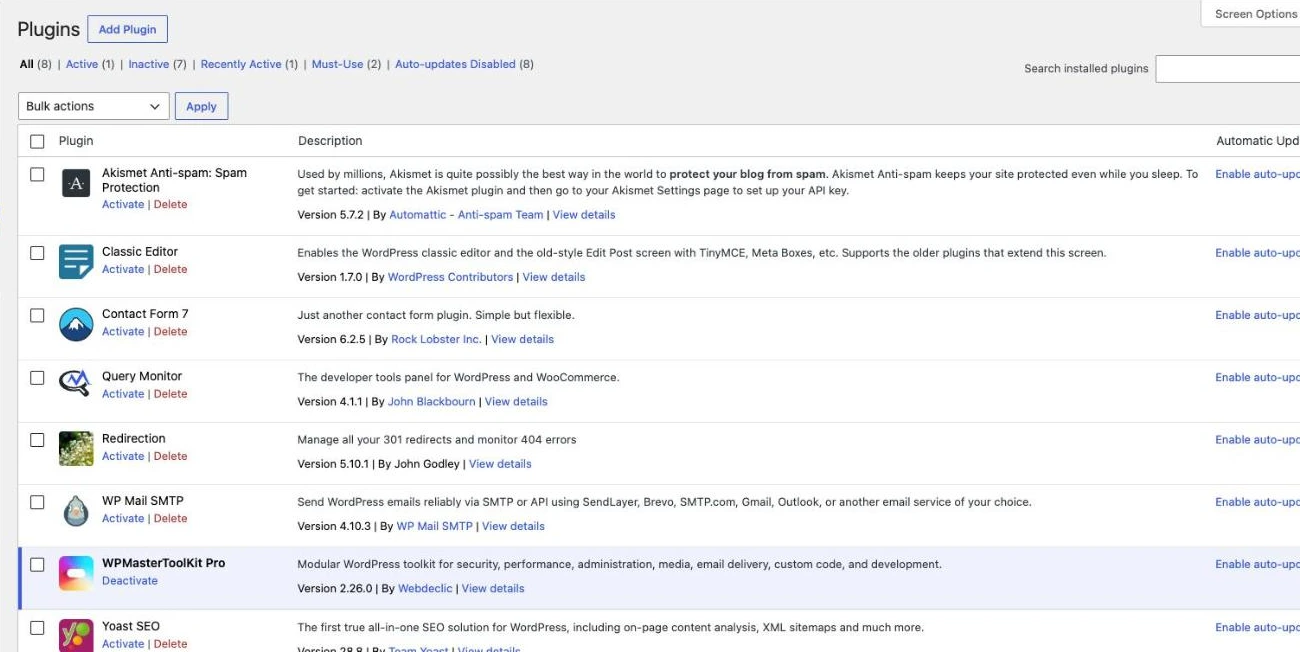
By default, the «Installed Plugins» screen in WordPress displays only names and descriptions: on a site with dozens of plugins, it takes a long time to find what you're looking for. The module Image Plugins WPMasterToolKit adds the icon for each plugin in front of its name, just like in the WordPress.org directory. It's free and requires no configuration.
Which plugin can this module replace?
It replaces the small plugins that add WordPress.org icons to the plugin list, and goes a step further by also supporting many premium plugins and plugins sold on WooCommerce.com.
Main features
- WordPress.org Icons: For extensions in the official repository, the icon is retrieved from the update data that WordPress already has cached, without making an additional request; otherwise, it is retrieved once via the WordPress.org API.
- Premium extensions: The Pro versions of well-known plugins (ACF PRO, Elementor Pro, UpdraftPlus Premium, etc.) use the same icon as their free versions, and about 30 premium plugins not available on WordPress.org (Divi Builder, Breakdance, Oxygen, Gravity Forms, WP Rocket, Perfmatters, MemberPress, LearnDash, etc.) display their publisher’s logo.
- WooCommerce.com Extensions: Extensions purchased on the WooCommerce Marketplace display their official icon.
- Default icon: An extension without a known icon is assigned a generic icon to keep the list neatly aligned.
- Multisite: The icons also appear on the Extensions screen in the network administration interface.
How to use this module
Activate Image Plugins in WPMasterToolKit, then open Extensions > Installed Extensions : The icons appear automatically. There is nothing to configure.
Our technical choices
- Charged only where it is used: The module only affects the extensions screen; it does not affect the admin panel or the public site.
- Progressive loading: Missing icons are retrieved in the background, in small batches, without slowing down the page's display.
- Caching: A found icon is retained for 7 days; an unsuccessful search is not retried until one hour has passed.
- Verified sources: Only images served via HTTPS by WordPress.org, WooCommerce.com, or the plugin developer's website are accepted, and a match is considered valid only if the plugin developer matches.
- Privacy: Images are loaded without revealing your website's address (
no-referrer).
Conclusion
Image Plugins is a small module that makes everyday life easier: a more readable list of extensions where you can spot each tool at a glance, with no configuration required and no impact on the site’s performance.