

 EN
 FR
 ES

Captcha Module on the Login Form: A Simple Math Problem to Keep Bots Out
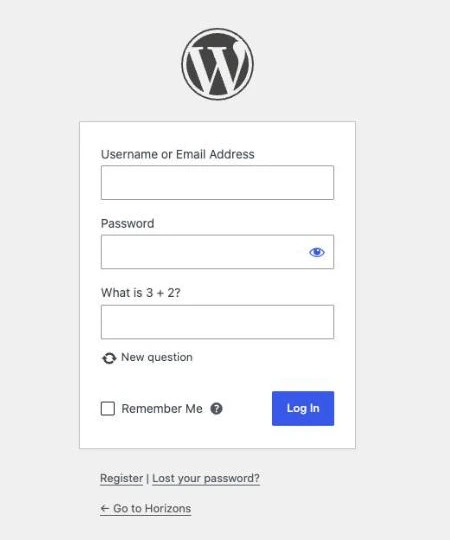
WordPress login, forgotten password, and registration forms are prime targets for bots. The plugin Captcha on login form WPMasterToolKit adds a simple addition problem («What is 3 + 2?») to these three native forms; the problem is generated and verified on your server, without using any third-party services. The module is free; the adaptive mode is available only in the Pro version.
Which plugin can this module replace?
It replaces mathematical CAPTCHA extensions such as Really Simple CAPTCHA or Math Captcha on the WordPress login page. It is not equivalent to reCAPTCHA, hCaptcha, or Turnstile: it does not perform behavioral analysis and only protects native WordPress forms (not those from WooCommerce or form builders). It adds a simple layer of friction that complements—but does not replace—a limit on login attempts, such as our Limit Login Attempts module.
Main features
Three secure forms
- Login form: the login form (username and password).
- Forgot Password Form: the email request to reset the password.
- Registration form: the native registration form, if registration is open on your site.
Each form is activated separately. The «New question» link offers another calculation, and the CAPTCHA also works without JavaScript.
Two protection modes
- Always require: The question appears every time on the protected forms.
- Adaptive (Pro): The question only appears when recent activity seems suspicious. Legitimate visitors log in without any issues, while repeated attempts trigger the question.
Adaptive Mode Settings (Pro)
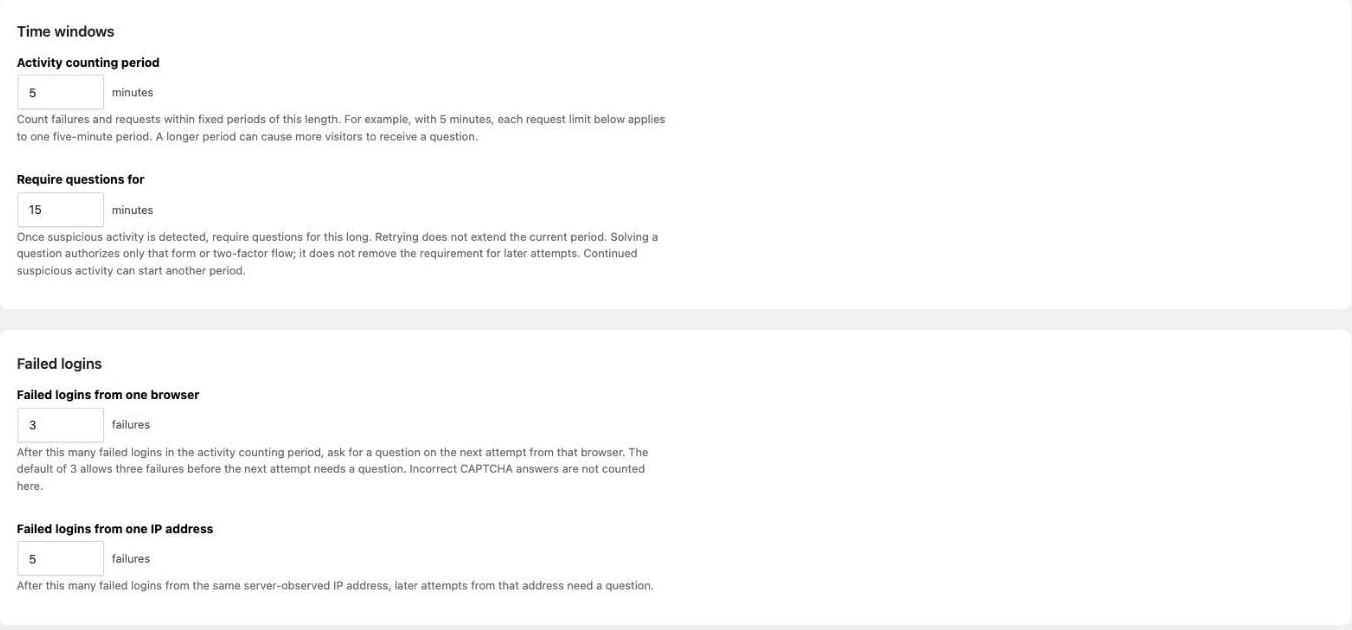
Adaptive mode tracks failed attempts and form submissions over a short period of time, separately for each browser and each IP address. Once a threshold is reached, the question becomes mandatory for a specified period of time. All thresholds are adjustable:
- Activity counting period: Duration of the counting period (5 minutes by default).
- Require questions for: The length of time the question remains mandatory after a suspicious activity (15 minutes by default).
- Failed logins from a single browser / from a single IP address: Number of allowed failed connection attempts (3 per browser and 5 per IP address by default).
- Request limits: Number of login form submissions (10), reset requests (3), registrations (3), and two-factor authentication code requests (3).
- Form timing: A form submitted too quickly (less than 1,500 ms by default) is flagged as suspicious and triggers the question earlier.
How to use this module
- Activate Captcha on login form in WPMasterToolKit, then open WPMasterToolkit > Captcha on the login form.
- Select the «Always require» mode or, in Pro, «Adaptive.».
- Check the boxes next to the forms you want to protect.
- In adaptive mode, adjust the time periods and thresholds as needed, then click «Save.».
- Open your login page in an incognito window to check how the question appears.
Our technical choices
- 100 % local: No calls to external services, so no visitor data is shared with third parties.
- Single-use questions: Each question is linked to the browser via a technical cookie, expires after 10 minutes, and can only be attempted once. Only a hash (HMAC) is stored in a dedicated table that is cleared every hour by the cron job.
- Built-in anti-abuse limits: The number of queries, responses, and errors generated per IP address is capped over a 5-minute period. The filters
wpmastertoolkit_captcha_issue_limit,wpmastertoolkit_captcha_validate_limit,wpmastertoolkit_captcha_failure_limit,wpmastertoolkit_captcha_activity_limitandwpmastertoolkit_captcha_cancel_limitallow these limits to be adjusted. - Generic error messages, that never reveal whether an account exists.
- Accessibility: labeled field, mobile numeric keypad, messages announced to screen readers.
- Compatible with other WPMasterToolKit modules: An incorrect CAPTCHA answer is not counted as a failure by Limit Login Attempts; two-factor authentication (Pro) checks the CAPTCHA before sending a code via email; and the CAPTCHA works with Move Login URL and Custom Login Design.
- API access is not affected: Application passwords, XML-RPC, and REST APIs do not go through secure forms.
Good to Know
- If you're using a reverse proxy or a CDN, configure your server to pass through visitors' actual IP addresses; otherwise, they will all share the same IP address—and thus the same limitations.
- Exclude the login page and AJAX requests from your page cache.
- Keep the login attempt limit enabled: the calculation acts as a deterrent for simple bots, but it is not a foolproof verification method.
Conclusion
Captcha on Login Form protects native WordPress forms without relying on an external service or tracking your visitors. The «Always Require» mode is available for free; the adaptive mode in the Pro version only interrupts your users when necessary.