

 EN
EN  FR
FR  ES
ES 
Search Replace in database: securely search and replace in the WordPress database
Introduction
When you're managing a WordPress site, it's often the case that a simple "search / replace" becomes a real technical issue. Changing a domain name, migrating to a new environment, correcting URLs, cleaning up content, modifying e-mail addresses or replacing a recurring text string: on paper, it sounds simple. In reality, touching the database directly can quickly break a site, especially when serialized data is involved.
It is precisely to meet this need that we have developed the Search Replace in database from WPMasterToolKit. The aim is clear: to offer a tool integrated into WordPress to make database replacements safer, easier to read and more convenient, without relying on a dedicated external plugin.
Which plugins can the Search Replace in database module replace?
This module can replace specialized extensions such as :
- database search/replace plugin, such as Better Search Replace
- simple URL migration tool
- bulk text replacement extension for WordPress tables
The idea is not just to do a "find and replace", but to do it with a logic adapted to WordPress: support for serialized data, preview of modifications, step-by-step execution, simulation mode and management of certain sensitive precautions such as the column guid or the siteurl.
Why doesn't a simple SQL search and replace just do the trick?
On WordPress, not all data is stored in plain text. A significant proportion of options, metadata and plugin settings are stored as serialized data. This means that a classic SQL replacement can break the data structure if the string length is no longer consistent after modification.
The module Search Replace in database has been designed to avoid this problem. It doesn't just replace a string in plain text: it is capable of traversing the data, deserializing what needs to be deserialized, applying the replacement and then correctly re-serializing the result.
This is essential for any WordPress migration or maintenance operation.
An interface designed for targeted replacements
The module adds a dedicated page to WPMasterToolKit administration. From this interface, you can precisely define your search and replace operation.
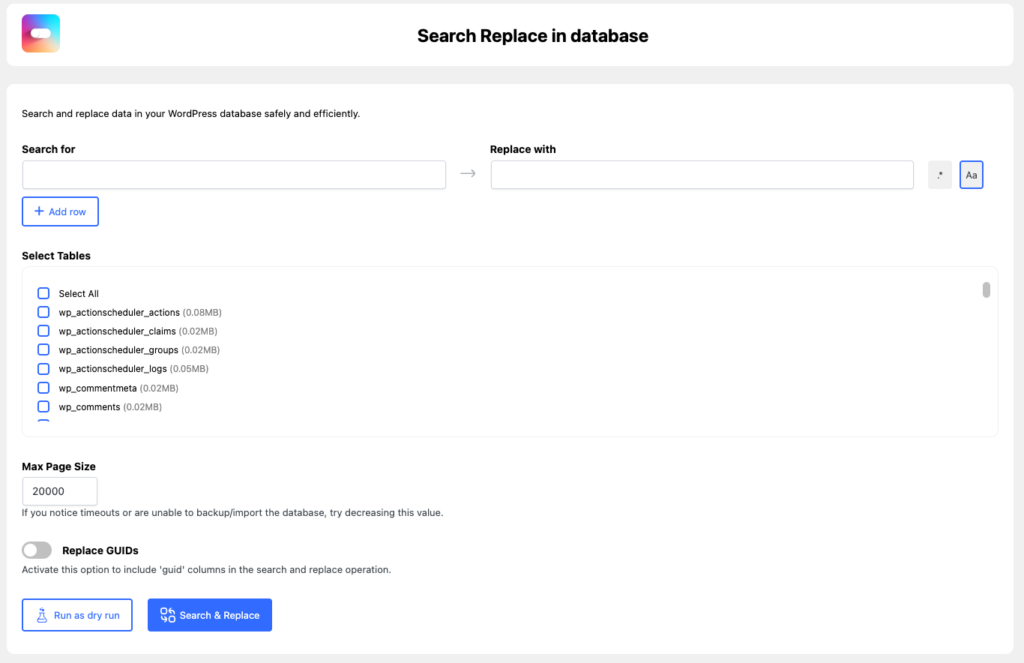
In particular, you can :
- enter a value to search for
- indicate replacement value
- select one or more database tables
- adjust batch size
- choose whether or not to include columns
guid - run either a simulation or the actual replacement
The interface has also been designed to remain readable at runtime, with progress, real-time status, processing statistics and an overview of detected changes.
Several search/replace pairs in Pro version
The module works with a system of search/replace lines. Logically, each line contains :
- a value to be sought
- replacement value
- treatment options
In the free version, use is deliberately limited. In the Pro version, you can go even further by adding multiple lines, enabling you to link several replacements in a single operation.

This is particularly useful during a migration or global clean-up, for example to replace several URLs, paths or configuration strings in a single pass.
A simulation mode before writing to the database
This is one of the most important points of the module: you can launch a dry runa complete simulation.
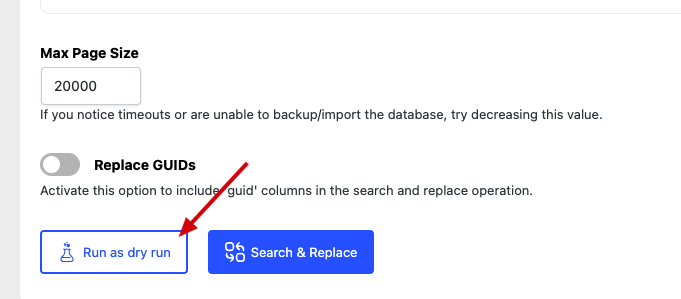
In this mode, the module scans the tables and detects any cells that might be modified, without actually writing the changes to the database. So you get an overview before executing the final operation.
This approach is very useful for :
- check that a search returns the right hits
- avoid too large a replacement
- measure real impact before implementation
- securing a sensitive migration or correction
In practice, this allows us to work with much greater confidence.
A clear overview of detected changes
The module doesn't just announce a number of results. It also generates a overview of changeswith :
- the table concerned
- line identifier
- the relevant column
- a visual extract of the before-and-after content
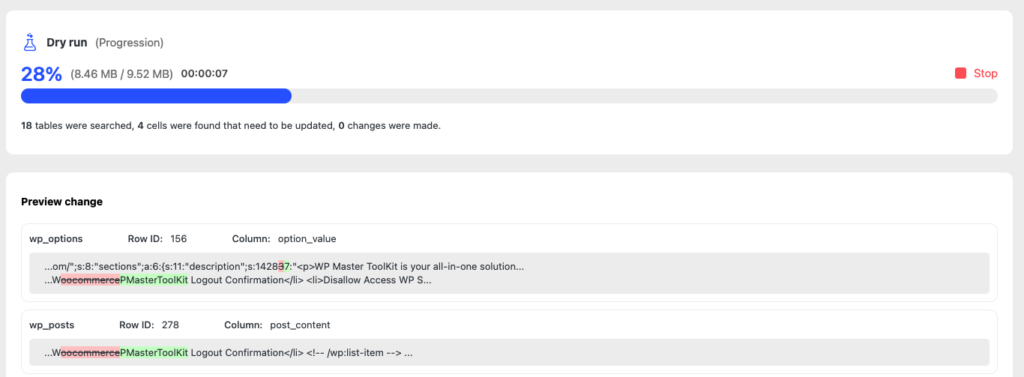
The preview system highlights the differences in an easy-to-read way. For short content, it displays a complete comparison. For longer content, it isolates the modified areas with context before and after the change.
It's a real convenience to quickly check that the tool is working exactly where you want it to.
Step-by-step execution for large databases
The module does not attempt to process the entire database at once. It works by lots and by processing pages. This approach makes it easier to manage large sites and limit the risk of server-side timeouts.
You can also adjust the Max Page Size. If your hosting is limited, or if you're experiencing runtime problems, simply reduce this value to lighten each batch processed.
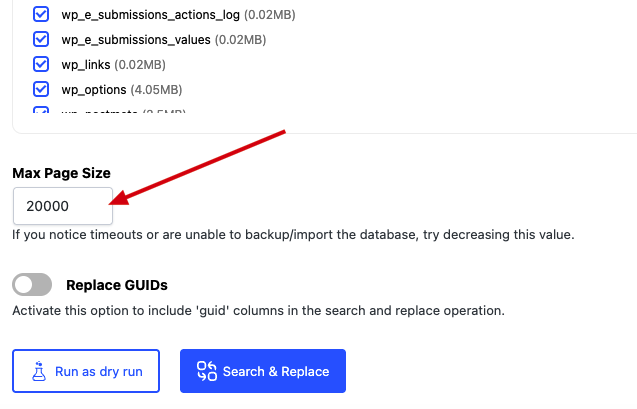
This technical choice allows the module to be used on small sites as well as on heavier WordPress installations.
Management of serialized data, tables and objects
Technically, this is one of the module's strong points. It doesn't limit itself to simple text. It can also browse :
- serialized chains
- paintings
- clonable objects
- interlocking structures
Replacement is applied recursively, allowing you to intervene in depth in the data stored by WordPress or other plugins.
The module also takes special care with certain serialized content with references. In this case, it avoids risky deserialization and applies an adapted logic to preserve the structure as much as possible.
Replacing GUIDs: a voluntary option
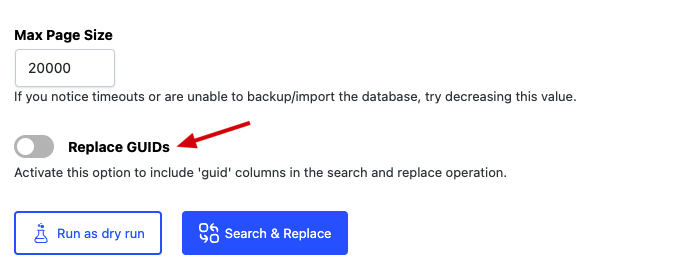
By default, the module ignores guid. This is an important choice, because in WordPress, these values don't always have to be replaced automatically.
For users who know exactly what they're doing, there's an option to enable GUID replacement. This feature remains voluntary and deactivated by default to avoid common migration errors.
In other words, the module favors caution without blocking advanced uses.
Special siteurl management to limit risks
The siteurl is sensitive in WordPress. A poorly managed modification can make access to the site or administration more complicated.
The module applies a specific logic here: instead of immediately modifying this value at the wrong moment, it can process it separately and update it at the end of the operation. This reduces the risk of interruption during the process.
It's a technical detail, but it shows the module's philosophy: allow powerful actions, while keeping safeguards adapted to WordPress.
Regular expressions and case: useful options for advanced uses

Each search/replace line can include additional options:
- Match case to respect the case
- Regex to use regular expressions
Case management enables finer-tuning of replacements. Regular expression support opens the door to much more advanced uses, for example to correct repetitive structures or harmonize content according to a precise pattern.
In line with the module's logic, the Regex option is reserved for Pro users.
Differences between free and Pro versions
The module can be used free of charge, but with certain limitations designed to reserve the most advanced uses for the Pro version.
In the free version :
- adding additional lines is blocked
- regular expressions are disabled
- detailed overview of results is limited
- only the first modified cells are displayed in plain text
Above a certain threshold, additional results are deliberately masked with an obfuscation system. This allows you to test the module and understand how it works, while keeping advanced processing for the Pro version.
How to use this module
It's very easy to use:
- Open page Search Replace in database in WPMasterToolKit.
- Enter the value to be searched for and the replacement value.
- Select the tables to be analyzed.
- Adjust batch size if necessary.
- Enable GUID replacement if necessary.
- First, run a dry run to visualize the impact.
- Check the results displayed.
- Then launch Search & Replace to actually execute the changes.
Good practice is always the same: make a backup of the base before any real replacement, then start with a simulation.
Our technical choices for this module
We have developed this module with several specific objectives in mind.
The first was the safety. That's why we've integrated nonce verification on the AJAX side, step-by-step processing, special logic for certain sensitive options and respect for serialized data.
The second was the WordPress compatibility. Instead of a simple global SQL replacement, we preferred a more refined approach, capable of understanding the structures actually used in the WordPress ecosystem.
The third was the readability. A search and replace tool shouldn't be a black box. That's why we've added progress indicators, counters, a detailed overview of changes and a simulation mode.
Finally, we also wanted to keep the WPMasterToolKit spirit: to offer a useful, stand-alone module that can be activated only when you need it, without unnecessarily loading the rest of the plugin.
Conclusion
The module Search Replace in database from WPMasterToolKit meets a very real need: to search and replace in the WordPress database without using an external tool, while maintaining maximum security.
With its simulation mode, change preview, serialized data management, batch processing and advanced options, it's ideal for site administrators, developers and freelancers who regularly work on migrations and maintenance operations.
This is exactly the kind of functionality we wanted to integrate into WPMasterToolKit: a practical, powerful tool, designed for WordPress, and capable of replacing an additional specialized plugin on its own.